
There are many ways to use Chameleon Tone Match.
You can use it strictly as a Tone-Matched IR within an existing preset, allowing you to build signal chains such as:
EQ → Distortion → Amp → Chameleon Tone-Matched IR → Reverb
You can also experiment with different combinations of amps, effects, EQ, distortion, modulation, and other processing to shape the tone exactly how you want it.Alternatively, Chameleon Tone Match can be used to create a complete, independent preset using only the provided effects, modeled amps, and Tone-Matched IRs.
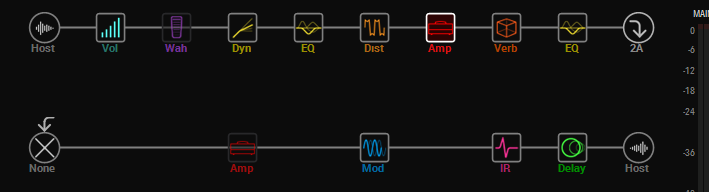
Or advanced setups including this authors prefered method is the 4 cable method.
Four-Cable Method (4CM)
The Four-Cable Method (4CM) connects a multi-effects processor to a guitar amplifier in a way that lets you place effects both before and after the amplifier’s preamp section.
This gives you greater control over your signal chain. Effects such as wah, compression, boosts, and overdrive can be placed before the amp’s preamp, while effects such as chorus, delay, and reverb can be placed after the preamp through the amplifier’s effects loop.
Connection Guide
- Cable 1: Connect your guitar to the Input of your multi-effects processor.
- Cable 2: Connect the processor’s Send to the front Input of your guitar amplifier.
- Cable 3: Connect the amplifier’s FX Send to the Return of your multi-effects processor.
- Cable 4: Connect the processor’s Main Output to the amplifier’s FX Return / Power Amp In.
Internal Signal Routing
Inside your multi-effects processor, place an FX Loop block in the signal chain. This block represents your amplifier’s physical preamp section.
Your signal flow will look approximately like this:
Guitar → Multi-FX Effects → FX Loop Send → Amp Preamp → Amp FX Send → FX Loop Return → Multi-FX Effects → Amp Power Section
Effects placed before the FX Loop block will run into the front of the amplifier. This is typically where you would place:
Wah → Compressor → Boost → Overdrive → Distortion
Effects placed after the FX Loop block operate after the amplifier’s preamp. This is typically where you would place:
Chorus → Modulation → Delay → Reverb

Using the Four-Cable Method (4CM) allows you to combine your amplifier’s natural preamp tone with the flexibility of your multi-effects processor while maintaining proper effect placement throughout the signal chain.
I prefer this method for several reasons. I personally set the amplifier’s controls to the 12 o’clock position and use my presets to manage the EQ and fine-tune the overall sound. This allows me to switch between completely different tones without having to adjust the amplifier’s controls during a performance.
You can also incorporate effects such as Poly Capo to digitally change the tuning of your instrument without physically retuning the guitar. For example, with the press of a single footswitch, you could switch from a heavy metal tone in E Standard to a blues tone in D Standard, with the preset automatically handling the tone, effects, EQ, and tuning change.
This makes 4CM an extremely flexible setup for live performance, allowing dramatic changes in both tone and tuning without touching your amplifier or physically retuning your guitar.
Chameleon Tone Match takes that flexibility even further by making it faster and easier to recreate your favorite tones—potentially reducing the time spent building and fine-tuning presets to a fraction of what it would normally take. At the same time, it gives you the freedom to move beyond tone matching and create a sound that is entirely your own.
You get the polished, refined sound of a carefully crafted preset while retaining the crisp, dynamic character of a tube amplifier. Rather than sacrificing the effects and processing you love, Chameleon Tone Match allows you to integrate them with your amp’s natural tone, giving you more freedom to experiment, create, and develop your own unique sound.